Designing a lean pipeline to bridge the gap between leads and properties
SaaS
Dashboards
Automation
UX/UI Design
Development
A look at how we helped Roofy, a growing real-estate brokerage, turn a messy mix of spreadsheets, email threads, and ad-platform dashboards into a single workspace for listings, leads, and deals.
About the project
Roofy manages hundreds of residential listings across several busy cities.
Before this product, the team was juggling a CRM, Excel files, maps, email, and messengers — all in parallel.
The goal was to create one system where agents and managers could:
see the health of the sales pipeline at a glance
manage properties in both list and map views
keep meetings, inquiries, and status updates in one place
In short, a modern internal tool that actually matches the pace of their day-to-day work.


Challenge
Real-estate operations are naturally fragmented:
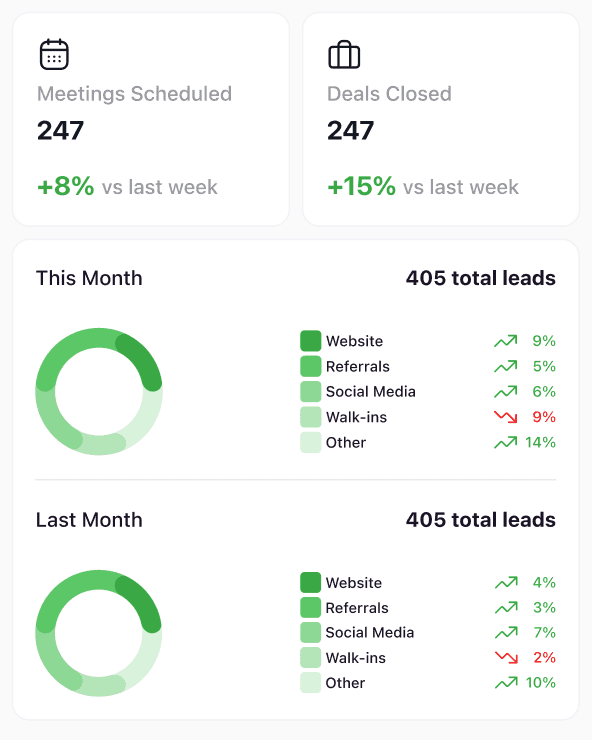
Leads arrive from many channels (website, social media, referrals, walk-ins, phone calls).
Listings live on different platforms, while deal stages are tracked elsewhere.
Managers struggle to answer basic questions quickly: What’s working? Which listings are hot? Where are we losing leads?
Roofy needed:
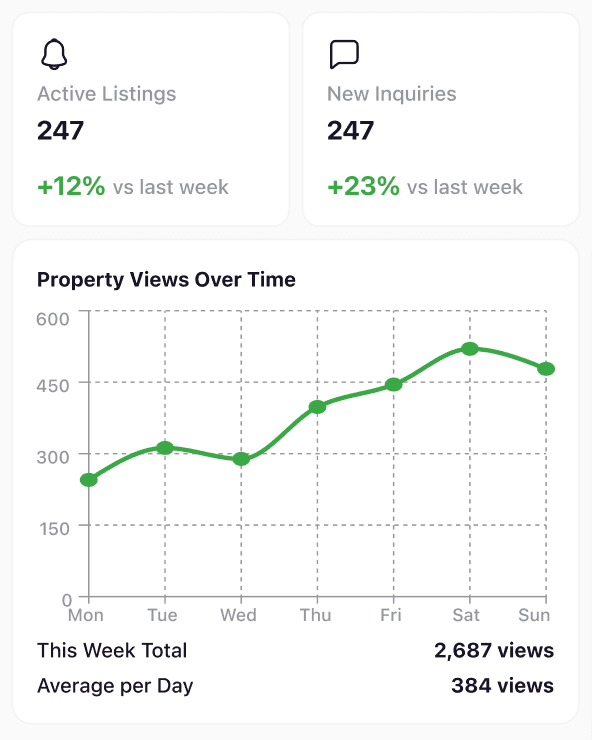
an interactive dashboard that shows funnel health and listing performance in one view
a unified properties screen where list and map stay in sync
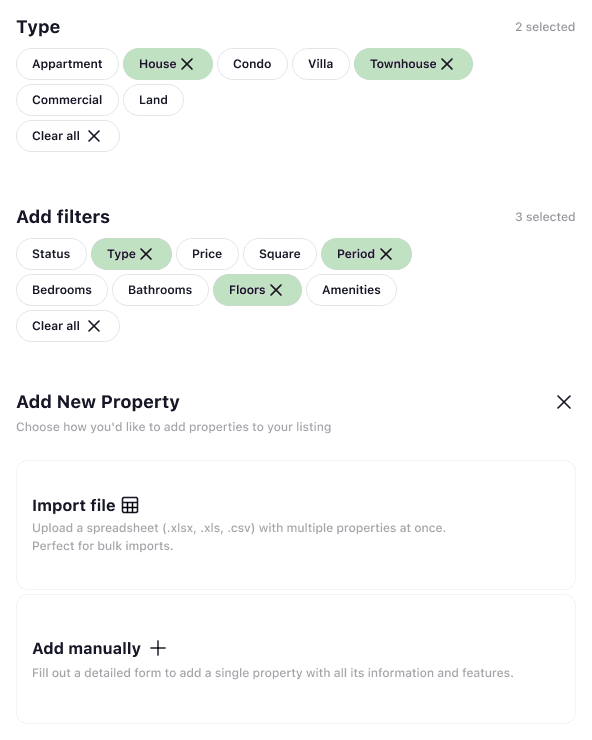
simple filters and modals so agents can add and update listings without getting lost in complex CRM logic
Our Approach
We started from a simple question: what does “I found my place” look like on a phone screen?
From there, we designed the product as a single, continuous story:
Journey & Roles Alignment
We mapped the full journey from “I’m thinking about moving” to “I’ve booked a place” and identified three key moments: first impression, discovery & comparison, and deep dive into one property. These moments became three main screens: onboarding, search, rental.
UX and Visual Strategy
The app follows a calm, content-first layout with large imagery, generous spacing, and clear typography. We focused on one primary action per screen (start, search, book), predictable patterns (search bar, cards, bottom navigation), and microcopy that sounds like a conversation, not a contract.
Mobile Architecture
We designed the app to work as a white-label shell: the same structure can support multiple brands or buildings by swapping content, colors, and assets, without breaking the UX.
Design System for Future Features
Buttons, cards, tags, icons, and spacing tokens were turned into a small but solid mobile design system so Nestly’s team can grow the app (filters, profiles, payments) without redesigning from scratch.
Every feature was designed not only for ease of use, but also to build trust, ensure transparency, and support operational clarity — three essentials for any hospitality brand that relies on direct bookings and returning guests.
Key Features
Understanding the agent’s day
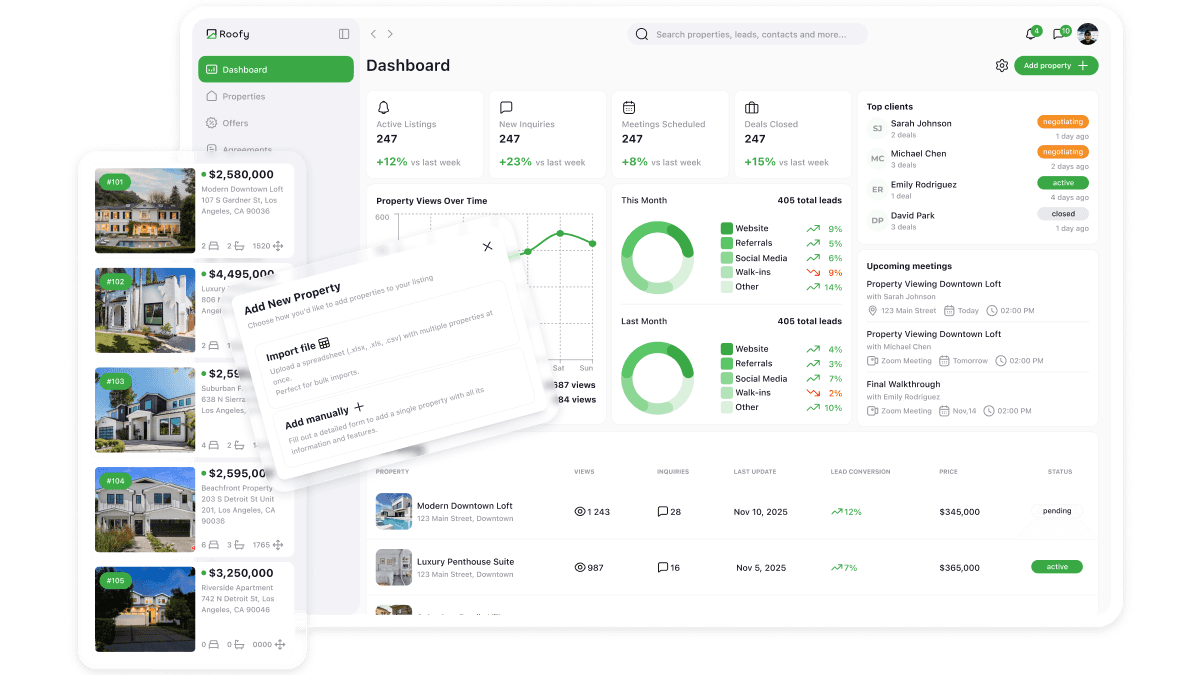
We started by mapping a typical day of a real-estate agent: checking new leads, reviewing active listings, planning viewings, and updating deal statuses. Instead of copying a classic CRM, we designed the product as a personal control center where the agent can see “what’s happening with my business today?” in one place.
A personal performance dashboard
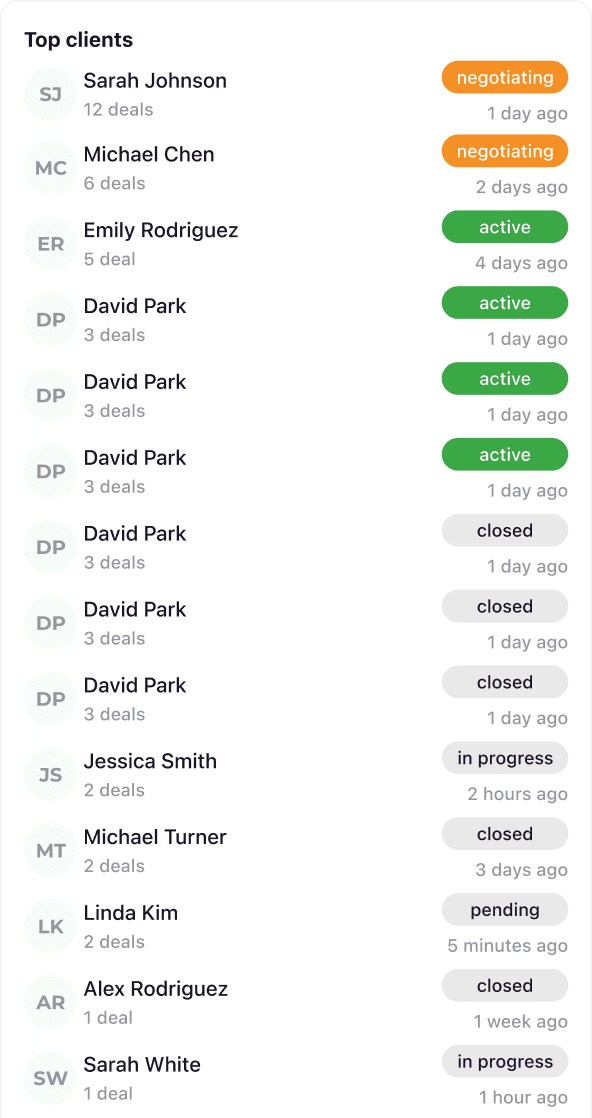
The first screen acts as the agent’s daily overview: number of active properties, new inquiries, meetings scheduled, and deals in progress. Simple charts show trends over time, while a “Top clients” and “Upcoming meetings” panel surfaces the people and events that matter most right now.
Centralised property portfolio
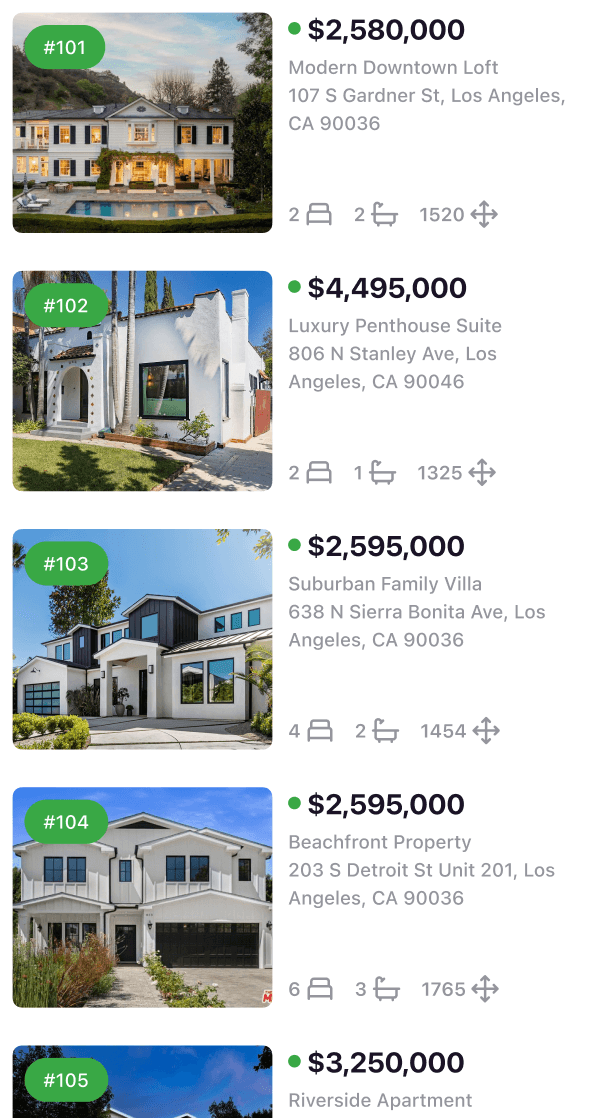
All properties live in a dedicated Properties area where the agent can see their entire portfolio at a glance. The table layout focuses on what matters day-to-day: price, status, location, bedrooms, last update, and basic performance. Sorting and quick filters help to instantly jump from “all listings” to “only active apartments in the city center”.
List + map for smarter context
To keep the agent from jumping between tools, we combined a list view and a map on the same screen. The list is ideal for managing details and statuses, while the map helps understand location, proximity, and neighbourhood context. Selecting a property highlights it in both views so the agent always knows where this listing lives in the city.
Fast add & edit flows
We designed a simple “Add new property” flow as a modal that doesn’t pull the agent away from their current context. Key fields are grouped into logical blocks (basic info, price, address, features), and existing properties can be edited inline. The goal is to make updating the portfolio something the agent can do between calls, not a separate task for “later”.
Light-weight pipeline & tasks
Instead of a heavy CRM, the agent sees a light-weight pipeline: which properties are newly listed, which have active interest, and which are close to a deal. A small tasks/meetings section ties viewings and follow-ups directly to properties and clients, so the agent can plan their day around what actually moves deals forward.
Consistent UI for future growth
All screens use the same visual language — cards, tables, filters, chips, and soft status colors — so the cabinet feels like one coherent tool. This makes it easy to add new sections later (e.g. personal goals, commissions, documents) without confusing the agent or breaking the existing workflows.
Tech Stack
Frontend: React, TypeScript
Backend: Node.js, GraphQL
Database: PostgreSQL
Infrastructure: AWS (ECS, RDS), S3 for media storage
Integrations: Google Calendar, Google Maps, listing portals APIs, email and calendar sync
Design: Figma
Results
Web app MVP shipped in 4 months, then expanded into a full internal platform for all sales teams.
Listing management time per agent reduced by ~30% thanks to unified list + map views and faster updates.
Lead follow-up rate improved by ~20%, as upcoming meetings and high-value clients are surfaced directly on the dashboard.
Reporting overhead dropped significantly because management can now get weekly performance insights directly from the dashboard instead of manual Excel exports.
Why This Matters
For modern real estate agents, a personal dashboard is no longer a nice-to-have. It’s the place where listings, leads, and day-to-day decisions meet. Clients don’t just compare properties — they compare how quickly an agent responds, how organised they are, and how confident they sound about the numbers.
A focused, agent-first workspace — dashboard → properties → clients — helps teams:
Increase conversion from inquiry to deal by keeping active leads, meetings, and hot listings in one clear pipeline.
Reduce admin overhead because updates, filters, and property details live in a single interface instead of across spreadsheets and chats.
Strengthen client relationships by giving agents a real-time view of what’s happening in their portfolio, so they can follow up faster and with better context.
Every feature in the Roofy dashboard was designed not just for usability, but to reinforce clarity, control, and trust — three essentials for any real estate professional who relies on personal reputation and repeat clients.
Astana, KZ
Turning complex ideas
into high-performance products
©
2026
AlexFrontEnd
A. Bobykin SP · TIN 821019050222
NP 113, 23 Bukhar Zhyrau St, Astana, Kazakhstan