From reactive crisis control to a real-time property command center
Real Estate
Automation
Development
UX/UI Design
SaaS
A look at how we helped property.com, a mid-size hospitality group, design a manager dashboard that gives a single view of what’s happening across all their hotels — from guest requests and room status to housekeeping and maintenance.
About the project
property.com operates several city hotels under one brand.
Each hotel had its own tools, spreadsheets, and messaging channels, which made it hard for regional managers to understand what’s happening right now across properties.
The idea was to build a manager’s control room — a web dashboard where you can:
switch between hotels or see all of them at once,
track requests, tasks, and room status in real time,
coordinate housekeeping, maintenance, and front desk without hopping between tools.
The result is a calm, dark-style interface that lets managers focus on signals, not noise.


Challenge
Running multiple hotels at once creates a specific kind of mess:
Guest requests, incidents, and special cases live in chats and email threads.
Housekeeping, front desk, and maintenance operate in siloed systems.
Managers only see problems when it’s already too late: missed cleanings, delayed maintenance, unhappy guests.
property.com needed a way to:
see all properties in one place, without losing the ability to dive into details;
prioritise tasks and issues before they impact guests;
balance workloads between days and teams based on real data, not gut feeling;
do all of this without overwhelming managers with yet another complex system.
Our Approach
Understanding hotel operations at scale
We started by mapping how regional and on-property managers make decisions during a typical day: reviewing arrivals and departures, assigning tasks, reacting to urgent issues, and checking that tomorrow is under control. The goal was to support these mental checklists with a visual system, not replace them.
Multi-property architecture
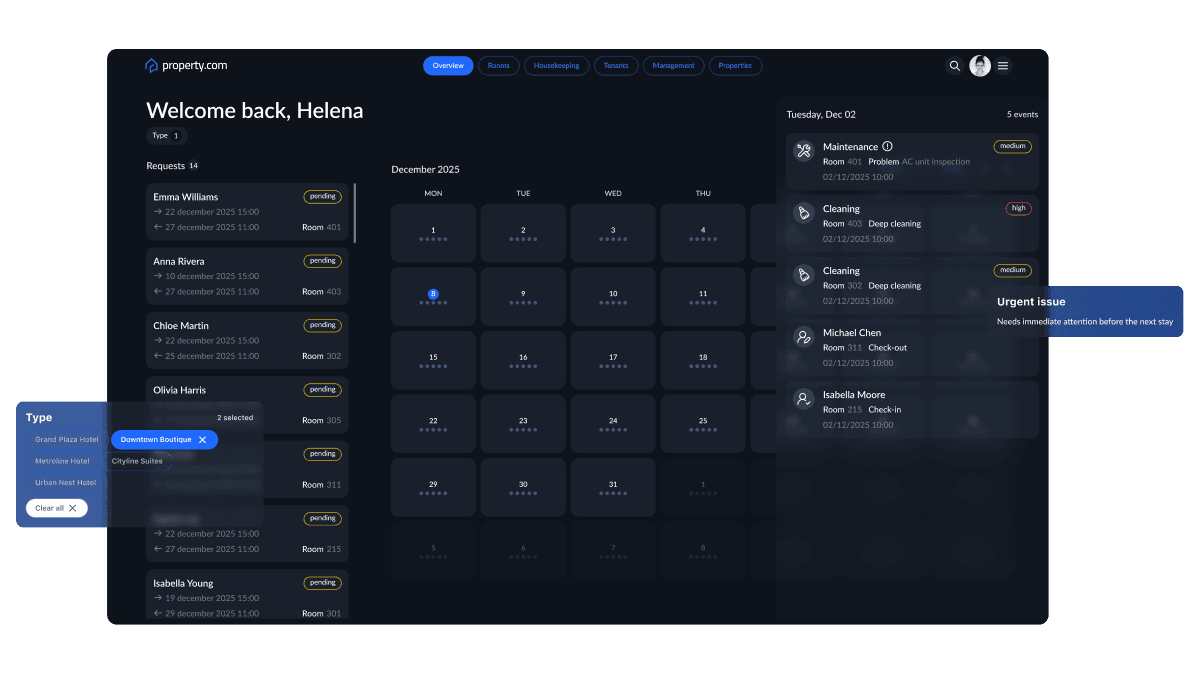
We designed the app around a multi-property view: managers can filter by hotel (Downtown Boutique, Cityline Suites, etc.) or look across all of them. The navigation mirrors core operations — Overview, Rooms, Housekeeping, Tenants, Management, Properties — keeping the product flexible enough for different hotel sizes and structures.
Calendar-driven overview
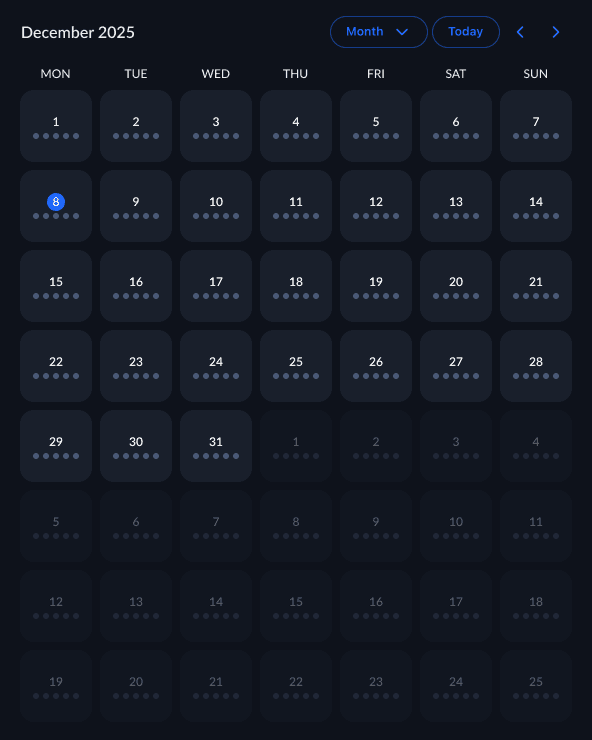
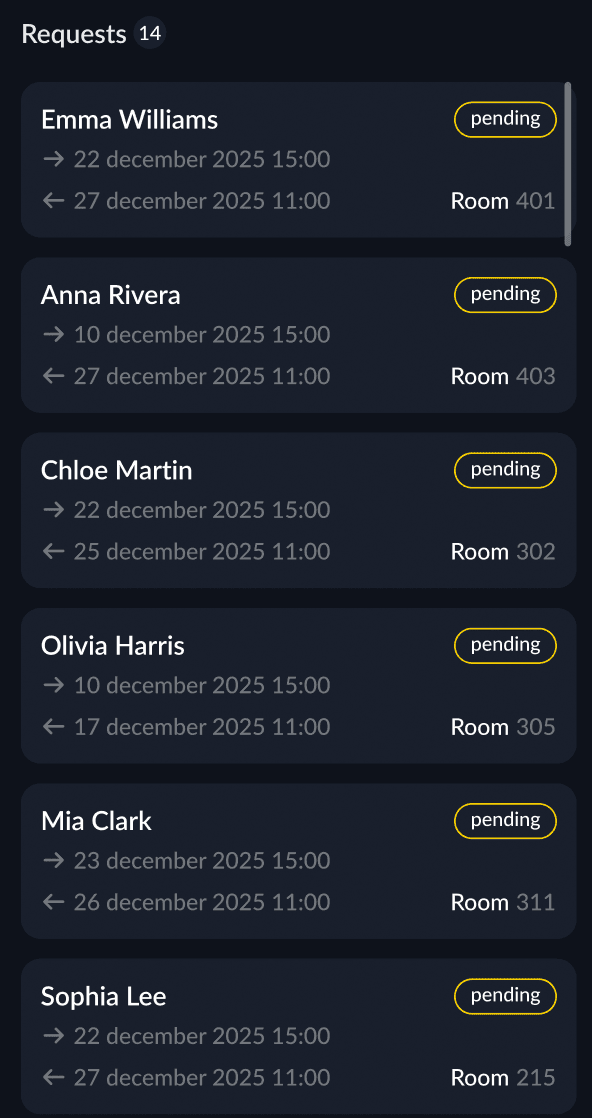
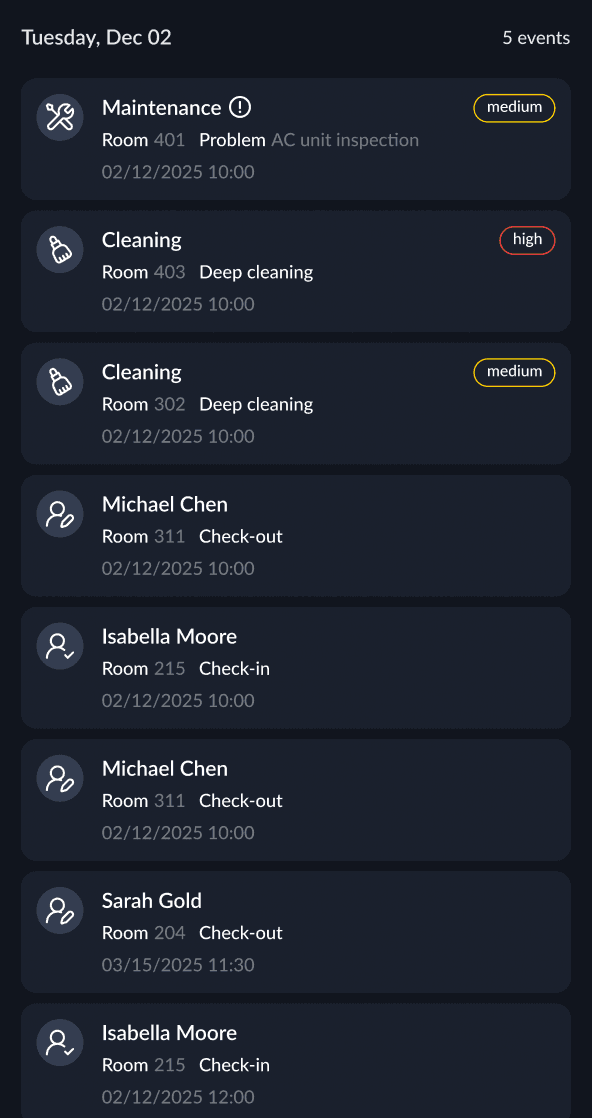
Instead of another table of numbers, the main Dashboard uses a monthly calendar grid to show bookings and workload across days. Side panels for Requests and Urgent issues turn the screen into a daily command center: what’s coming, what’s pending, and what needs attention right now.
Housekeeping & maintenance cockpit
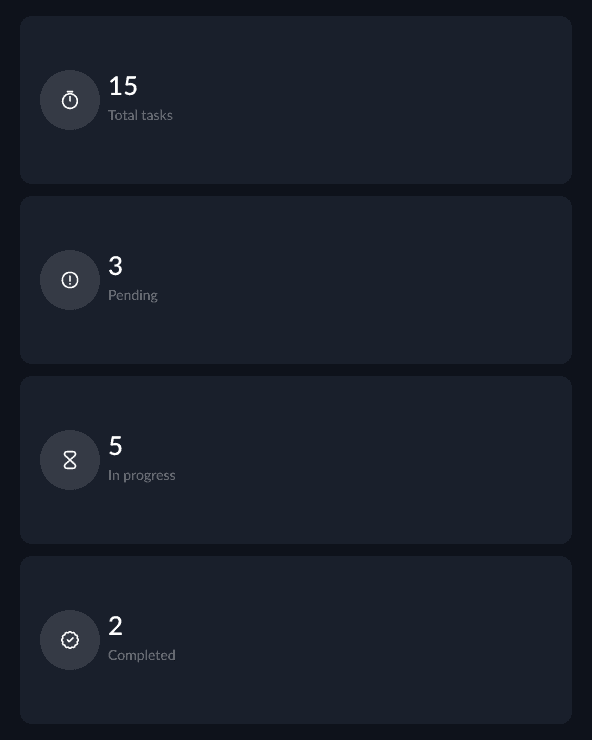
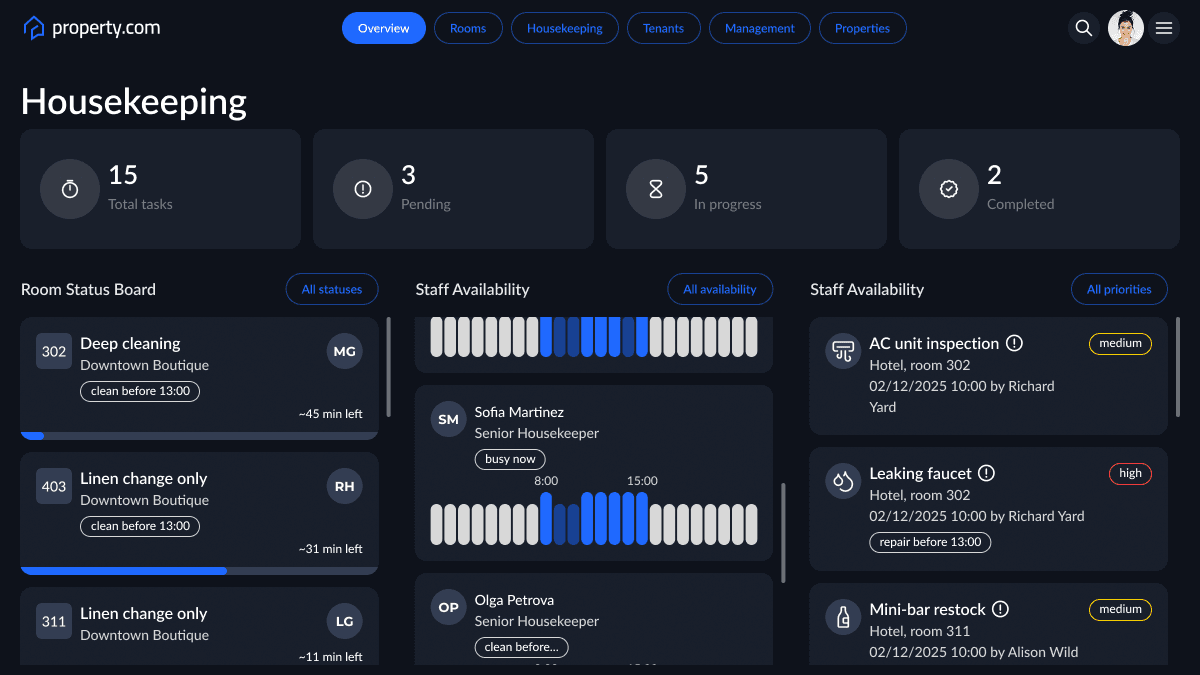
For the Housekeeping tab, we created a dedicated operations board: high-level stats at the top (total tasks, pending, in progress, completed) and three columns below — Room Status Board, Staff Availability, and Maintenance & inspections. This mirrors how managers think: rooms → people → technical issues.
Filters, priorities, and focus
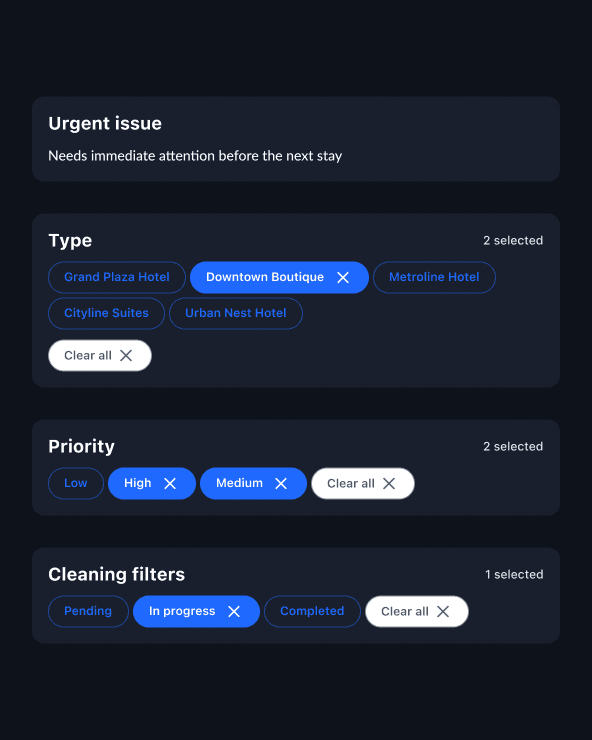
We kept filters as lightweight floating modals (Type, Cleaning filters, Priority) to avoid heavy sidebars. Managers can quickly slice the view by hotel, task status, or priority (low / medium / high) without losing context. Visual chips and subtle badges ensure the UI stays readable even with many filters applied.
Design system for dark operations UI
Because this tool is used all day, we went with a dark, low-contrast base and bright accents only for states and alerts. Components — cards, chips, timelines, calendars, progress bars — were turned into a compact design system so new modules (e.g. F&B, engineering) can be added later without redesigning everything.
Key Features
Multi-property manager dashboard
The main Dashboard welcomes the manager by name and shows all Requests for the selected hotels alongside a month-view calendar. Pending stays, date ranges, room numbers, and statuses are visible at a glance, so managers immediately see where attention is needed.
Calendar-based occupancy & workload
The central calendar shows booking density and activity by day. Dots and markers under each date hint at the volume of tasks and stays, helping managers spot spikes in workload and plan staffing ahead of time.
Urgent issues side panel
On the right, an Urgent issue feed surfaces the most critical tasks: maintenance problems, deep cleaning, check-ins and check-outs with time and room details. Priority badges (e.g. high, medium) and short descriptions make it easy to decide what to escalate first.
Housekeeping room status board
In the Housekeeping view, the Room Status Board lists all cleaning tasks by room and type (Deep cleaning, Linen change only). Progress bars and time estimates (e.g. “~45 min left”) help managers see if the team is on track before guests arrive.
Staff availability timeline
The middle column shows Staff Availability with a timeline for each housekeeper. Green and white bars between 8:00 and 15:00 indicate when each person is busy, available, or off, allowing managers to rebalance workloads without opening separate schedules.
Maintenance & inspections queue
On the right, a structured list shows AC inspections, leaks, window repairs, smoke detector tests and other technical tasks, each tied to a room, time, and priority label. Grouping these tasks in one column reduces the chance that maintenance issues silently block rooms from being sold.
Smart filters for type, status, and priority
Floating modals for Types (per hotel), Cleaning filters (pending, in progress, completed), and Priority make it easy to zoom in on exactly what matters — for example, “high priority maintenance today across all hotels” or “in-progress cleaning tasks in Downtown Boutique only”.
Tech Stack
Frontend: React, TypeScript, React Query for data fetching
Backend: Node.js with a modular REST/GraphQL API layer
Database: PostgreSQL for operational data, Redis for caching real-time counters and queues
Infrastructure: AWS (ECS/Fargate, RDS, S3), CI/CD via GitHub Actions
Integrations: Google Calendar, Property-management system (PMS), maintenance ticketing tool, internal user directory/SSO, calendar provider for scheduling
Design: Figma
Results
Operational visibility centralised into one manager dashboard, replacing multiple spreadsheets and chat threads per property.
Response time to urgent issues reduced by ~30%, as high-priority tasks are surfaced in a dedicated, always-visible panel.
Housekeeping planning accuracy improved, with fewer last-minute room changes thanks to a clearer view of workload and staff availability.
Cross-property management became simpler, enabling one manager to confidently oversee several hotels from a single interface.
Why This Matters
For hotel groups and operators, consistency is everything: guests expect the same level of cleanliness, speed, and care in every property. But behind the scenes, teams juggle dozens of tools and local processes that don’t talk to each other.
A focused, multi-property manager cockpit helps brands:
See the full picture in real time, instead of after the fact in weekly reports.
Act on problems before they hit the guest, by prioritising maintenance, cleaning, and check-in tasks in one place.
Scale operations across properties, because managers rely on the same patterns, views, and priorities no matter which hotel they’re looking at.
Every screen in this dashboard was designed not only to make work easier, but to reinforce trust, transparency, and operational clarity — the foundations of delivering a reliable guest experience at scale.
Astana, KZ
Turning complex ideas
into high-performance products
©
2026
AlexFrontEnd
A. Bobykin SP · TIN 821019050222
NP 113, 23 Bukhar Zhyrau St, Astana, Kazakhstan